A small handful of pieces. They do a lot.
A Safe holds your content. A Recipient is who it's for. A Trigger is what fires the release. A Pending Release window gives you a last chance to cancel. Everything else flows from those four ideas.
The Safe
A logical container for one delivery. Files, photos, voice memos, video, written notes. Encrypted on your device with a unique key. The Safe owns its own recipients, its own triggers, and its own lifecycle — independent of every other Safe in your vault.
Lifecycle states: Draft → Sealed → Pending Release → Released. (A Sealed Safe with no recipients or triggers is a personal vault — it stays sealed forever unless you decide otherwise.)
The Recipient
Each Safe can have one or more recipients. They're added by email — and verified by clicking a link before they ever receive content. Each recipient has their own per-Safe wrapped key, so removing one doesn't affect the rest.
Recipients don't see your other Safes, your other recipients, or the Safe contents — until release fires and the cooling-off ends.
The Trigger
What event causes the Safe to release? Pick one or combine several. The first one to fire wins — the Safe releases.
The two trusted-release options — Releasee and Quorum — are the architecture that makes TRS unlike anything else. Pick the shape of trust that fits each Safe.
- Releasee — a single trusted person you've designated can fire the Safe on your behalf using a key you've shared with them out-of-band. Privacy from helper, per-Safe scoping, out-of-band authorization — none of which the closest precedents (e.g. Google's Inactive Account Manager) offer.
- Quorum — N of M trusted contacts must agree before the Safe releases ("two of three must approve"). For higher-stakes content where one person's judgment shouldn't be enough. Zero consumer-space precedent.
- Scheduled date — release on June 14, 2030.
- Inactivity check-in — if you go quiet for X months despite reminders, the Safe begins to release.
- Manual — you fire it yourself, today, from your phone.
The Pending Release window
When a trigger fires, the Safe enters a Pending Release state — a cooling-off period before delivery. 24 hours by default. 72 hours for inactivity-based releases. You're notified the moment a trigger fires. You can cancel with one tap during the window.
Once the window closes, delivery is irrevocable. That's the explicit, intentional commitment line. We tell you exactly when it crosses.
Encryption that doesn't trust us
Every byte of content is encrypted on your device with a per-Safe symmetric key — XChaCha20-Poly1305, libsodium's modern authenticated cipher (the extended-nonce variant of the construction adopted by WireGuard and TLS 1.3). Authenticated means each ciphertext carries a tamper-evident seal: if any byte is altered in transit or at rest, decryption fails loudly. That symmetric key is then wrapped — once per recipient — using each recipient's X25519 public key (libsodium's sealed-box construction). The wrapped keys travel with the Safe. The encrypted content blob travels alongside.
Our servers see opaque ciphertext and a list of who's allowed to receive a wrapped key. We never see plaintext. We never have a master key. If a server is breached, the attacker walks away with bytes they can't decrypt.
Two-layer recovery, by design
Your sign-in password and your encryption keys are deliberately separate.
- Sign-in password: proves who you are to our server. Recoverable by email.
- Encryption keys: decrypts your Safes. Lives in your phone's secure enclave (Face ID / fingerprint-protected). Recoverable through Designees — a small trusted circle who can vote to vouch for you.
This means a forgotten password on the same phone is a 30-second fix. A forgotten password and a new phone is a Designee-recovery fix — slower, deliberately so, with a quorum requirement and a cooling-off period. No single person, including us, can hand your encrypted content to the wrong party.
Releasee-first, recovery-fallback
If you go quiet for too long, TRS doesn't immediately release content. It first reaches out to the Releasees you've designated — your spouse, your sibling, your closest friend — and lets them confirm the situation. Only if they don't respond, or if you haven't designated any, does the system fall back to the inactivity timer.
Because the human in your life is almost always more reliable than an algorithm.
When one person isn't enough
For releases where a single person's judgment shouldn't be sufficient — estate handoffs, business succession, sensitive multi-party disclosures — TRS supports Quorum triggers as an alternative to a single Releasee. You configure a set of trusted contacts and a threshold ("two of three must agree"). Each one votes independently; no individual voter can fire on their own. The same trust circle can serve as Quorum voters for one Safe and Releasees for another — it's the per-Safe configuration that decides how their authority works. The standard cooling-off window still runs after the threshold is met, so you can still cancel.
For the gritty details — threat model, key rotation, what we log and what we don't — see the Security page.
The full lifecycle of a release
From the moment you tap "Create Safe" to the moment the recipient opens it.
Draft
You build the Safe. Add files, write notes, pick recipients, configure triggers. Nothing has happened yet — content is encrypted and saved, but no triggers are armed.
Sealed
You finalize the Safe. Triggers arm. Recipients are notified that a Safe exists, addressed to them, and that it'll be delivered if/when the trigger fires. They don't see contents.
Pending Release
A trigger has fired. You're notified immediately. The cooling-off window starts. A live countdown shows you exactly when delivery becomes irrevocable. You can cancel with one tap.
Released
The window closed. Recipients are notified that their Safe is open. They sign in (or create an account in 30 seconds) and the wrapped key on the server unwraps with their device key. They see the contents. You see "Released" in your audit log.
The recording starts before they know it does.
There are moments where you don't have time to unlock your phone, open an app, and start recording. The Panic Trigger is for those moments. A gesture you can do without looking — sometimes combined with a phrase only you would say — starts an encrypted capture and streams it off your device immediately.
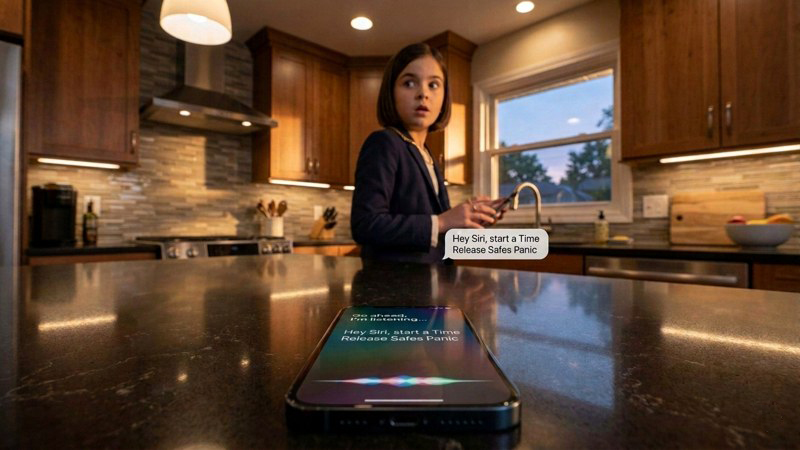
Or ask Siri to record TRS
Recognized only by your voice print
Start recording without unlocking, opening the app, or showing intent
You configure a multi-button or motion-and-button gesture that activates capture from anywhere — lock screen, sleeping device, in your pocket. Each user picks a gesture that's deliberate enough not to fire by accident, and unobtrusive enough that an adversary doesn't see you doing it. The composite design (the patented part) is what stops accidental activations and stops a thief or attacker from disabling capture by pressing one button.
Hidden-from-abuser configuration
Stealth Mode disguises TRS as a working Clock app. A partner scrolling through your phone sees a Clock — not a safety tool. The disguise is yours to choose: a working clock with a stopwatch, a lock-screen look, a minimal always-on display, or a mimic of your own real lock screen built from a photo you pick. The real TRS is reached by holding one corner of the decoy for five seconds: deliberate enough not to trigger by accident, obscure enough that no one finds it by looking. Voice activation still works from the lock screen — “Hey Siri, start a recording with Time Release Safes” starts an encrypted recording without ever opening the visible app. And the disguise extends to capture itself: while a recording is running, the screen can cloak behind the same working clock — someone glancing at the phone sees a stopwatch, not a viewfinder, while the recording continues underneath. The screen is cloaked; iOS’s green camera dot still shows, as Apple requires. A built-in practice mode outlines every hidden hold zone on the decoy so the gestures become muscle memory before you ever need them. Designed for anyone whose device might be picked up by the person they’re most afraid of.
How the Panic Trigger works on iOS.
TRS uses Apple's Back Tap accessibility feature (Settings → Accessibility → Touch → Back Tap), which has been part of iOS since iOS 14. During TRS onboarding you assign a double-tap or triple-tap on the back of your phone to a TRS Shortcut. The Shortcut starts the Panic Trigger flow.
Because Back Tap is an OS-level accessibility feature, the gesture works from the lock screen, when the screen is off, and when other apps are open. There is no TRS icon to find. There is no app to open. The tap pattern alone starts the capture.
For the spoken phrase, TRS uses its own on-device word recognition — not Siri. In Safety Phrase setup you choose a Panic Phrase only you would say. While a TRS safety flow is live — a recording, a Check-in, the Stealth clock — the app listens locally and escalates to a full Panic the moment it hears your phrase. Recognition happens entirely on the device: nothing you say is sent anywhere, and there is no Siri Shortcut to discover in your phone’s settings.
About the green and orange dots. When the camera turns on, iOS shows a green dot at the top of the screen. When the microphone turns on, iOS shows an orange dot. These indicators cannot be hidden by any app — TRS or any other. We've made this part of how the architecture protects you: a visible indicator turns the recording itself into a deterrent. The person in front of you knows a record exists of what happens next.
How the Panic Trigger works on Android.
On Pixel 5 and newer (Android 12+), TRS uses Google's Quick Tap feature (Settings → System → Gestures → Quick Tap), assigned to launch the TRS Panic Trigger directly. On non-Pixel Androids, the equivalent functionality is delivered through an Accessibility Service that watches for the configured back-tap pattern in the background.
As on iOS, the gesture works from the lock screen and when other apps are in the foreground. The Accessibility Service path requires the user to grant TRS the Accessibility permission during setup — we explain this clearly in onboarding because the permission is powerful.
For the spoken phrase, Android works exactly as iOS does: TRS’s own on-device word recognition listens while a safety flow is live and escalates to a full Panic when it hears your Panic Phrase — no Google Assistant routine required, and nothing you say leaves the device. (“Hey Google, start a recording with Time Release Safes” starts a recording, just as Siri does on iOS.)
About the camera and mic indicators. Android (since Android 12) shows visible indicators whenever the camera or microphone is active. These cannot be suppressed by any app. As on iOS, we treat them as part of the architecture: a recording that's also obviously a recording is harder for the other party to dismiss as something else.
What happens in the moments that matter most.
What if you have no signal?
The encrypted buffer holds locally on your device. When your phone reconnects — cell tower or WiFi — the buffer flushes to our servers and delivery to your Recipients completes, with no action needed from you. Severe network conditions (coverage gaps, a data plan running out, WiFi-to-cellular handoffs) can interrupt an upload or end a session early — whatever has reached our servers is always preserved and delivered. See our Terms for the details.
What if the phone is taken or smashed during capture?
Every chunk that has already left the device is already at our servers, on its way to your Recipients. Whoever has the phone now can't retroactively unsend what's already gone. Smashing the phone after the fact destroys nothing that matters.
Who receives the panic-trigger capture?
The Recipients you pre-designated during onboarding — a personal advocate, a lawyer, a family member, your own backup account, or any combination of these. Recipients for panic delivery are configured separately from your normal Safes so an emergency capture doesn't go to the wrong audience.
Can you cancel a panic-trigger capture?
A short cooling-off window after the capture ends lets you cancel delivery if you triggered by accident. Once that window passes, the capture goes to your Recipients. The window length is configurable during onboarding.
The Panic Trigger is part of TRS's patent-pending architecture.
Try it on your phone
Free on iPhone and Android. Safety is core — you only pay if you choose a larger plan later.
